
This page is an overview to get you oriented. The full, maintained documentation lives in the repository — the User Guide covers every connector, option and limitation in detail.
How it works#
credativ-pg-migrator is an offline migration tool. It connects to the source database,
introspects the data model, generates PostgreSQL-compatible structures and writes them into the
target instance. It is designed to run during a downtime or read-only window on the source, not
as a live replication solution.
In practice the migration speed is limited by hardware and connectivity — experience shows the source database server is usually the bottleneck, not the migrator.
Components#
| Component | Responsibility |
|---|---|
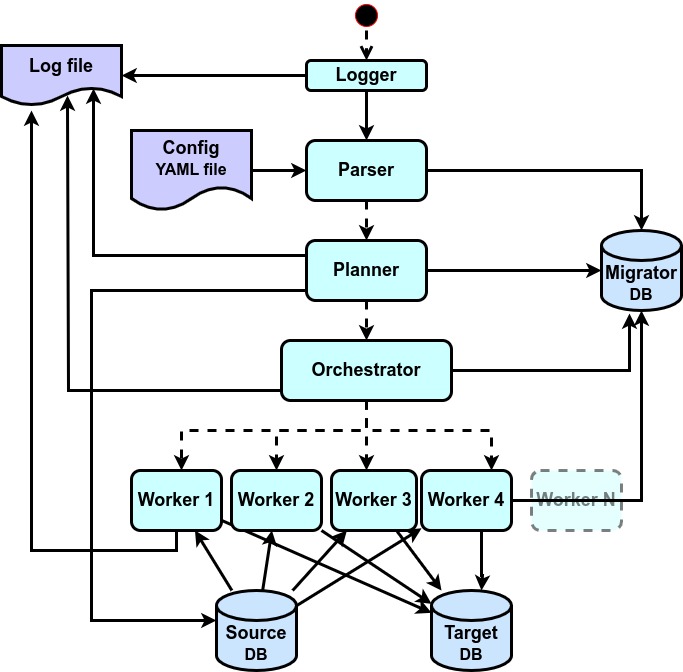
| Parser | Reads the YAML configuration file and the command line arguments. |
| Planner | Reads metadata and object definitions from the source and converts them into their PostgreSQL equivalents. |
| Orchestrator | Runs the migration steps and coordinates parallel workers. |
| Workers | Execute the data transfer and object creation in parallel. |
The three databases#
A migration always involves three logical databases:
- Source database — any supported engine, accessed via ODBC, JDBC or a native Python driver. It does not have to be a server: a SQLite source is a plain local file, and a DB2 z/OS source can be a set of offline DDL and CSV files.
- Target database — the PostgreSQL instance where the migrated schema and data are created. PostgreSQL is the only supported target.
- Migration database — a PostgreSQL database holding the migration protocol: every migrated object with its source code, the generated PostgreSQL code, and a success or failure marker with timestamps. Usually this is the target database itself, but it can be a separate one.
Installation#
Python package#
python3 -m venv migrator_venv
. ./migrator_venv/bin/activate
pip install credativ-pg-migrator
The package is on PyPI: pypi.org/project/credativ-pg-migrator.
Debian and Ubuntu#
credativ-pg-migrator is part of the apt.postgresql.org PostgreSQL community repository.
See the PostgreSQL APT wiki page for how to enable it.
Depending on your source database you will additionally need the matching ODBC or JDBC driver. SQLite is the exception — it needs no driver installation at all.
Configuration#
The migrator is driven by a single YAML file describing the source, the target, the migration database, which objects to migrate and how to convert them.
The fastest way to start is to copy the ready-made example for your source engine from
docs/configs/ and
adjust every line marked >>> ADJUST.
A configuration file typically covers:
- Source settings — engine type, host, port, database, credentials, connectivity type
(
odbc,jdbc,ddlor native) and driver/JAR/DSN details. - Target settings — PostgreSQL connection details and the default schema for migrated objects.
- Migration database settings — where the protocol tables are created.
- Object selection — which schemas to migrate, include/exclude lists for tables, views, sequences and routines.
- Data transfer options — per-table
WHEREfilters, batch sizes, conflict resolution and how foreign keys are handled during the load. - Type and default value mappings — rules mapping source data types and vendor-specific default expressions to PostgreSQL equivalents.
config_all_options_reference.yaml
documents every option that exists and is the authoritative reference — but it is not a
template. It lists mutually exclusive options side by side, so it cannot be used as a
configuration file as it stands.Running a migration#
credativ-pg-migrator \
  --config=./my_migration.yaml \
  --log-file=./my_migration_$(date +%Y%m%d).log \
  --log-level=INFO
Logging goes to both the console and the log file. Two levels are available, INFO and
DEBUG; on error a detailed message is printed. Rich information is written to the migration
database in parallel.
A typical migration project#
- Prepare PostgreSQL. Provision the target instance and decide whether the migration database is the same database or a separate one.
- Prepare connectivity. Install the required JDBC/ODBC/native drivers and verify the
connection independently — for example with
isqlfor ODBC — before involving the migrator. - Write the configuration. Start from the example for your engine, fill in the connection details, select the schemas and tables, and add the type/default mappings and data filters you need.
- Run a test migration against a non-production target at
INFOlevel. Inspect the log output, the protocol tables in the migration database and the resulting schema and data. - Adjust and re-run. Refine mappings, filters and object selection until the result is what you expect.
- Run the production migration during a downtime or read-only window on the source, validate the result, then switch the applications over to PostgreSQL.
The migration database#
The migration protocol is one of the tool’s key strengths. For every migrated object it records the source and target names, the SQL used to create the target, the status (success, skipped, error) and timestamps — for tables, indexes, foreign keys, views, sequences and for functions, procedures and triggers including both their original source code and the generated PostgreSQL code.
That makes it possible to:
- audit exactly what was migrated and how;
- compare source code against the generated PL/pgSQL — the practical way to review the best-effort conversions before trusting them;
- rerun or manually fix individual objects without redoing the whole migration.
Treat the migration database as read-only metadata: query it freely, but do not modify its tables directly.
Post-migration validation#
The migrator ships a validation engine that checks the target against the source independently of the migration itself:
- Row counts and full-table checksums for every live-connection source.
- Random row hashes and LOB byte sizes (currently Oracle, PostgreSQL and SQLite sources).
- Structural comparison of column, index and constraint counts, persisted in the
validation_tables,validation_indexesandvalidation_constraintsprotocol tables.
Results are reported as a Markdown summary with side-by-side grids; any mismatch flags the table validation as failed.
Further reading#
- User Guide & connectivity options — per-connector status, connectivity and limitations
- Feature matrix — which feature is supported by which connector
- Standard migration workflow
- Configuration examples
- Configuration parameters map